My Halo shows the data remaining and days left on your plan using network-reported usage. Your phone’s counter is a useful fallback when you cannot get online, but it is an estimate.
Check in My Halo
- Open the manage link in your order confirmation email. If you cannot find it, open My Halo, enter the email you used at checkout and choose Email me my link.
- Open your plan and find the Usage card.
- For a fixed-data plan, read the remaining data and the days remaining. Check when the usage was last updated.
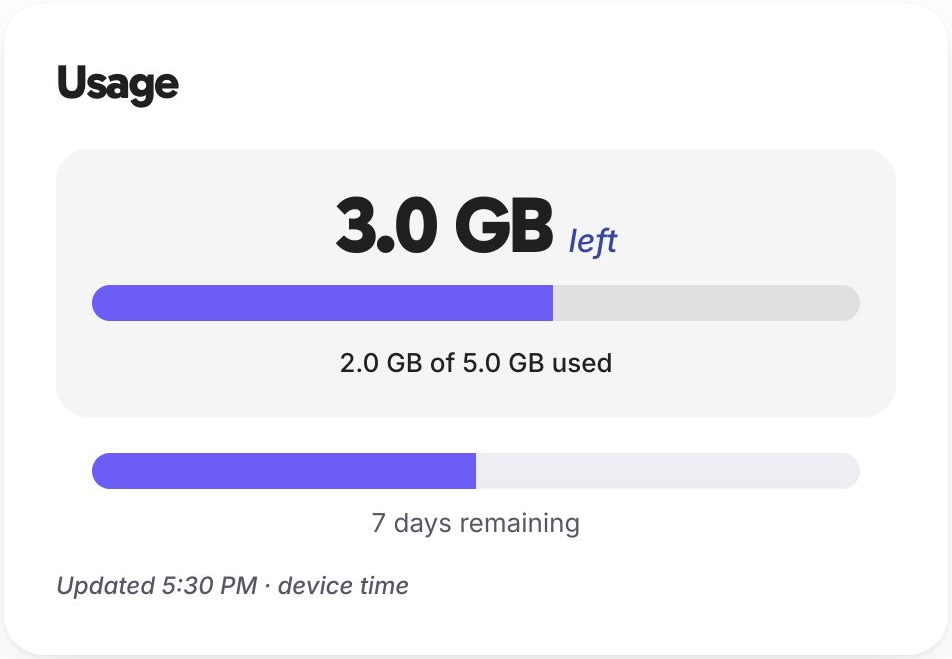
Unlimited plans have a different Usage view. They do not show a fixed total of remaining GB. Check your remaining days and how the daily full-speed allowance works.
If your phone’s estimate and My Halo disagree, use the network-reported figure in My Halo. It may take time for recent usage to appear.
Get a fresh My Halo link
Use the same email address you entered at checkout. Select Email me my link, then open the latest manage link in your inbox.
When you cannot open My Halo
Your device also tracks how much data each SIM line has used. Follow the instructions for your phone below. These counters show data used, rather than your current plan balance.
Check usage on iPhone
- Open Settings > Mobile Service (Mobile Data on older iOS).
- Scroll down to see data usage for each line.
- Find the Halo eSIM line (labelled with the name you gave it during installation, such as “Travel”).
- The Current Period figure shows how much data the line has used.
Compare this figure against the data allowance in your order confirmation email to estimate your remaining data.
Note: iPhone does not automatically reset the usage counter for each billing period. The figure shown may include data from a previous trip if you did not reset it. To reset: scroll to the bottom of the Mobile Service (Mobile Data on older iOS) screen and tap Reset Statistics.
Check usage on Samsung
- Open Settings > Connections > Data usage.
- Select the Halo eSIM line.
- The screen shows data used over the current period.
Check usage on Pixel and other Android devices
- Open Settings > Network and internet > SIMs.
- Tap the Halo eSIM line.
- View the data usage summary for the line.
Alternatively: Open Settings > Network and internet > Data usage. Select the Halo eSIM to view detailed usage by app.
What the numbers mean
Your device shows data used, not data remaining. To calculate your remaining allowance:
Remaining data = Plan allowance - Data used
Your plan allowance is listed in your order confirmation email (e.g. 1 GB, 3 GB, 5 GB, 10 GB).
When your data runs low
If your remaining data is getting low and you still have travel time ahead, consider purchasing additional data before your allowance runs out. See Top up your Halo data plan.
Top up while you still have an active connection. If your data runs out entirely, you will need Wi-Fi to access the Halo website.
Accuracy
Device-reported data usage is an estimate. The actual usage tracked by the network may differ slightly. If your data connection stops unexpectedly while your device shows remaining data, the network-side allowance may have been reached first.
Your portal page shows that network-side figure, so where the two disagree, the portal is the one to go by.