You can find an available payment receipt through your order details in My Halo.
Find your receipt
- Open the manage link in your order email. If you cannot find it, request a fresh link from My Halo using the email you used at checkout.
- Open a package in Your packages. For another purchase, open Past orders and select the order you need.
- In Order details, look for Order ID. When a receipt is available, the order number is a link that opens your Stripe-hosted receipt in a new tab.
- To save or print the receipt, use the options available on that receipt page or your browser’s print controls.
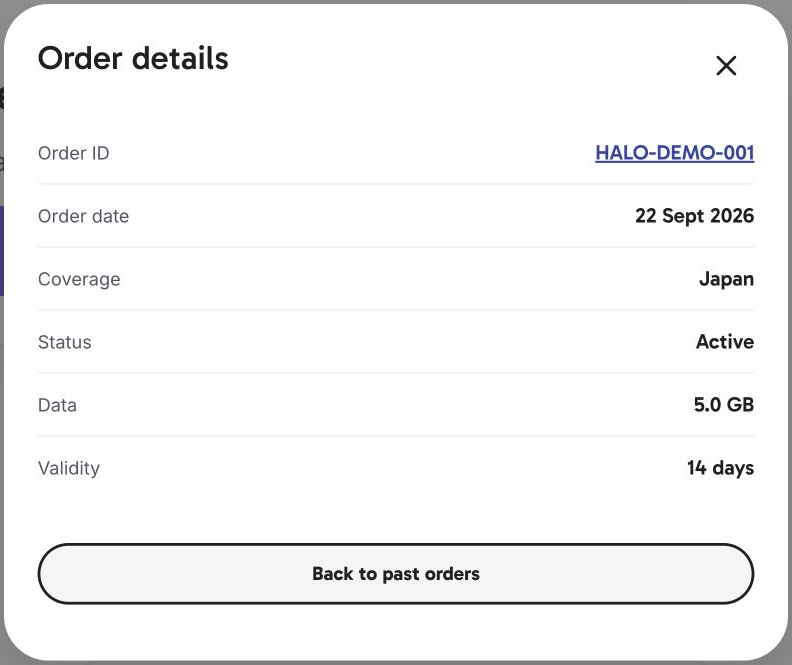
If the order number is plain text rather than a link, a receipt link is not available there. Ask Hal from the bottom-right corner if you need help finding it.
You may also have a link to a Halo receipt page from an earlier message. On that page, Print or save as PDF and Email me this receipt are separate options. Those buttons are not part of the My Halo Order details window.
Need your company details on the document?
Every order also has a downloadable PDF with its own number, which can carry your company name, billing address and tax ID. The related article below, on getting that document, walks through it.
What a Halo receipt page shows
- Order – your Halo order number
- Date – when you bought it
- Billed to – the email address used at checkout
- Plan – your destination and the plan, with its data allowance and how many days it runs
- Amount paid: in pounds sterling (GBP), with the amount your card was charged beneath if it paid in another currency
- Refunds – any refund applied to the order, dated, with the net paid
- Halo eSIM Ltd’s registered company details, at the foot of the page
If you cannot get into your portal
Portal links are tied to the email address used at checkout. Request a fresh link from the portal entry page using that address.
If you are not sure which address you used, or the link does not arrive, chat with Hal. Hal will take the details the team needs and pass your conversation to a real person, so you do not have to explain it twice.